AI for the
next disaster.
Tonight you build an AI prototype for the natural disasters our region faces: wildfires, floods, earthquakes, heat and drought. Everything you need is in the tabs below.
01Table guide
The worksheet from your table.
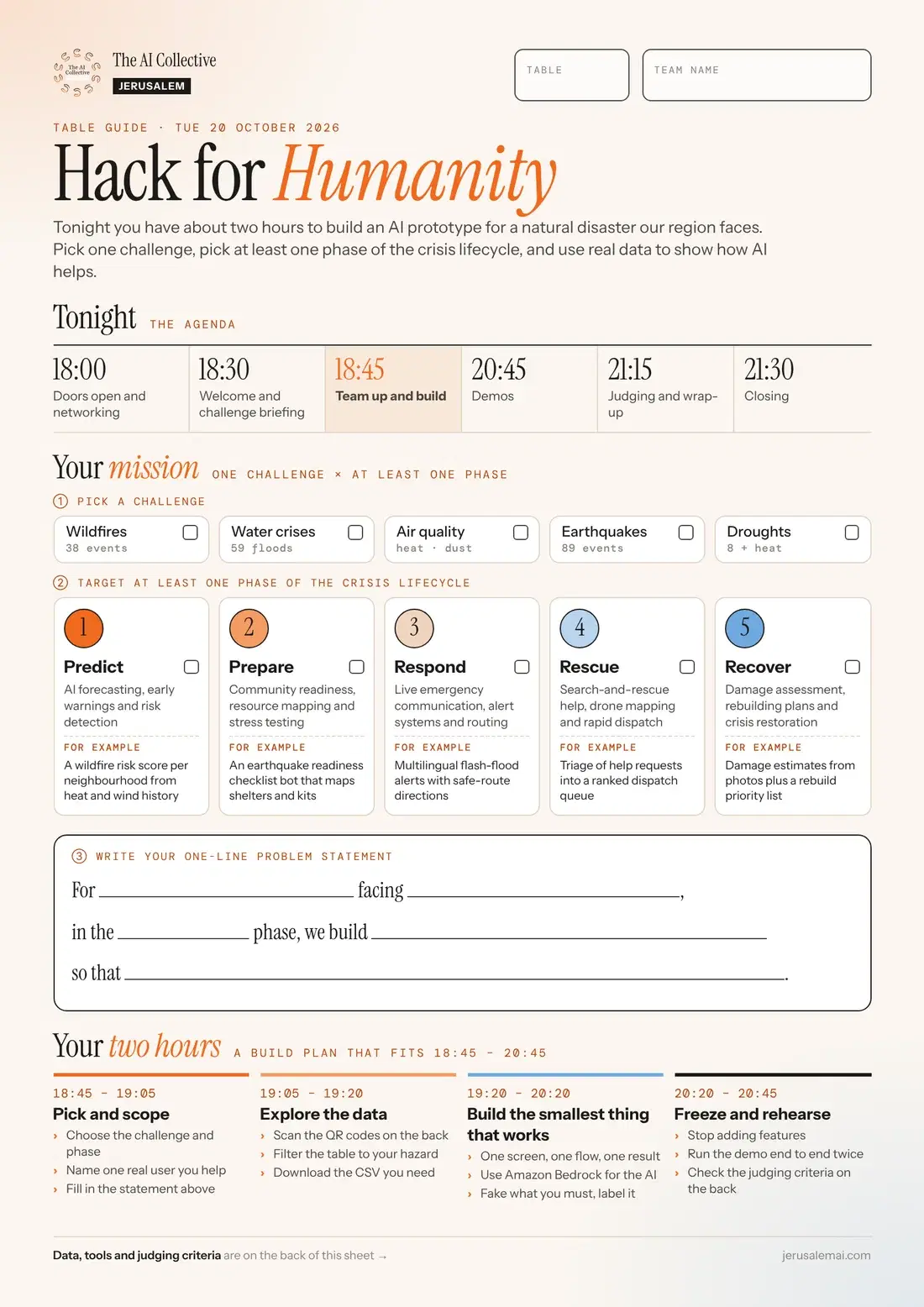
Fill it in online
Copy this into a shared doc or your team chat and fill in the blanks together. Your problem statement is also the first line of your demo.
Team name:
Challenge (Wildfires / Water crises / Air quality / Earthquakes / Droughts):
Phase (Predict / Prepare / Respond / Rescue / Recover):
One real user we help:

Problem statement:
For {who}, facing {what problem},
in the {phase} phase, we build {what}
so that {what changes for them}.

Build plan:
18:45  Pick and scope: challenge, phase, user, statement
19:05  Explore the data: filter the table, download the CSV
19:20  Build the smallest thing that works (Amazon Bedrock for the AI)
20:20 Freeze and rehearse: run the demo end to end twice02Judging
How you're judged.
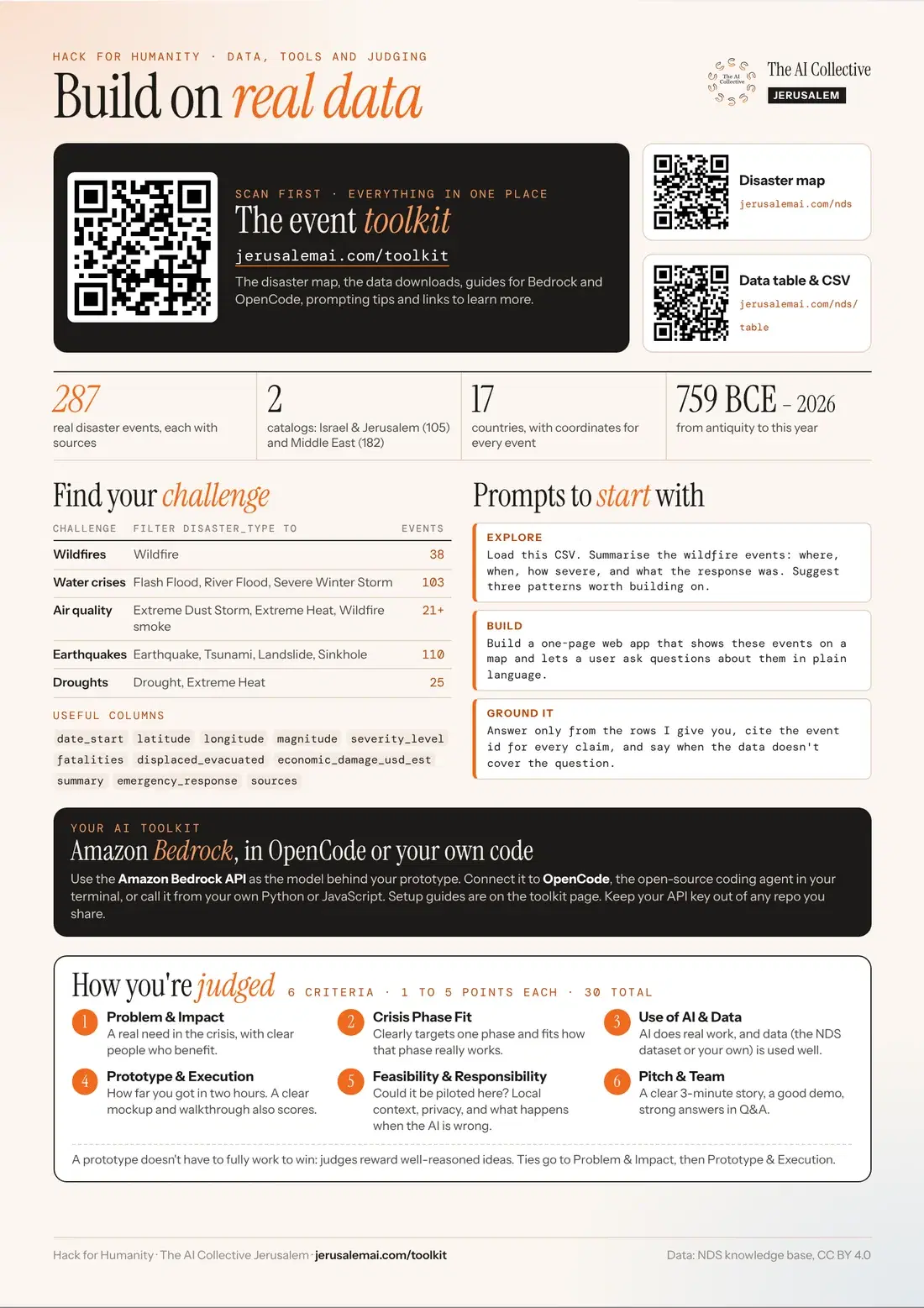
01 · 5 points
Problem & Impact
A real need in the crisis, with clear people who benefit.
02 · 5 points
Crisis Phase Fit
Clearly targets one phase (Predict, Prepare, Respond, Rescue or Recover) and fits how that phase really works.
03 · 5 points
Use of AI & Data
AI does real work, and data (the NDS dataset or your own) is used well.
04 · 5 points
Prototype & Execution
How far you got in two hours. A working demo is great; a clear mockup and walkthrough also scores.
05 · 5 points
Feasibility & Responsibility
Could it be piloted here? Local context, privacy, and what happens when the AI is wrong.
06 · 5 points
Pitch & Team
A clear 3-minute story, a good demo, strong answers in Q&A.
01The challenge
Pick a moment in the crisis lifecycle.
- 01
Predict
Can we see it coming?
- Wildfire-risk score from weather and past fires
- Flash-flood alert for a wadi or road
- Heat-wave warnings for vulnerable residents
- 02
Prepare
Are people and places ready?
- Personal or building preparedness plan generator
- Multilingual guidance in Hebrew, Arabic and English
- Earthquake readiness check for schools
- 03
Respond
What is happening right now?
- Turn messy reports into a live situation map
- Triage incoming calls or messages by urgency
- Rumour checker for crisis news
- 04
Rescue
Who needs help, and who can give it?
- Match volunteers, shelters and supplies to needs
- Safe-route suggestions around blocked roads
- Find people who live alone or need assistance
- 05
Recover
How do we rebuild, better?
- Damage report and aid claim helper
- Track rebuilding and donations transparently
- Lessons-learned summaries that feed the next Predict
02Getting started
Your first hour.
- 01
Form and pick
Meet your team, choose one phase of the lifecycle and one person you’re building for.
- 02
Explore the data
Open the NDS map and table. Find the disasters and places that matter to your idea.
- 03
Set up OpenCode
One laptop per team is enough to start. Install, paste the Bedrock key from your table guide, pick a model.
- 04
Ship a first version
Get anything working end to end, even ugly. Then improve the part the demo will show.
03The data
287 disasters, mapped.
- israel_jerusalem_natural_disasters.csv105 events in Israel and Jerusalem, 759 BCE to 2026Download ↓
- middle_east_natural_disasters.csv182 events across 17 Middle East countriesDownload ↓
- data_dictionary.jsonWhat every column means. Give this to your agent first.Download ↓
- hazard_risk_profiles.jsonRisk ratings per hazard for IsraelDownload ↓
- middle_east_hazard_profiles.jsonRisk ratings per hazard per countryDownload ↓
- README.mdSources, methods and how the catalogs were builtDownload ↓
Add live data
Free sources that pair well with the catalog.
- Open-MeteoFree weather forecasts and history, no API key.
- USGS Earthquake APIReal-time and historical earthquakes worldwide.
- NASA FIRMSActive fire hotspots from satellites.
- OpenAQAir-quality readings from stations around the world.
- GDACSGlobal disaster alerts from the UN and the EU.
- ReliefWebHumanitarian reports and situation updates, with an API.
04Setup
OpenCode + Amazon Bedrock.
Step 01
Install OpenCode
# macOS / Linux
curl -fsSL https://opencode.ai/install | bash

# or with npm (macOS, Linux, Windows)
npm install -g opencode-ai

# or with Homebrew
brew install anomalyco/tap/opencode
Step 02
Add your Bedrock key and start it
Prefer not to use the terminal for the key? Start opencode, type /connect, search for Amazon Bedrock and paste the key there.
# Paste your Bedrock API key and region (from your table guide)
export AWS_BEARER_TOKEN_BEDROCK="paste-your-key-here"
export AWS_REGION="us-east-1"

# Start OpenCode inside your project folder
mkdir my-project && cd my-project
opencode$env:AWS_BEARER_TOKEN_BEDROCK = "paste-your-key-here"
$env:AWS_REGION = "us-east-1"
mkdir my-project; cd my-project
opencodeStep 03
Prefer the browser? Open OpenCode web
Starts an OpenCode session in your browser instead of the terminal. Run it after setting the key, and keep the terminal open while you work.
# In the same terminal, inside your project folder
opencode web
Step 04
Pick a model and get going
/models      pick a model, e.g. a Claude Sonnet model on Amazon Bedrock
/init        let it read the project and write AGENTS.md
Tab          switch between Plan (thinks, no edits) and Build (edits files)
Optional: save the region in the projectShow
Put an opencode.json in the project root so everyone on the team uses the same region. Settings in this file win over environment variables. Keep the key itself out of it.
{
  "$schema": "https://opencode.ai/config.json",
  "provider": {
    "amazon-bedrock": {
      "options": { "region": "us-east-1" }
    }
  }
}/models shows no Bedrock models, check the key and region first, then ask a mentor.05Starter prompt
Your first prompt, filled in.
Read data/data_dictionary.json, then load
data/israel_jerusalem_natural_disasters.csv.

I'm building a {Predict / Prepare / Respond / Rescue / Recover}
tool for {who}. Build a simple Streamlit app that:
1. {first thing it shows or does}
2. {the AI part: what the model reads and what it answers}

Keep it to one file. Plan first, wait for my OK, then build.
Tell me the exact command to run it.06Demo
Two minutes, one story.
- 01Who is this for, and what moment in the crisis lifecycle?
- 02Show it working live, on real data.
- 03Point at what the AI does that a normal app couldn’t.
- 04Say what data you used and what you’d check before trusting it.
- 05One line on what you’d build next.
- 06Record a 60-second backup video, just in case.
07General resources
The field guide, for any build.
The data
Explore the disaster data.
287 natural disasters in Israel and the Middle East, on a map or in a table you can filter and download as CSV.